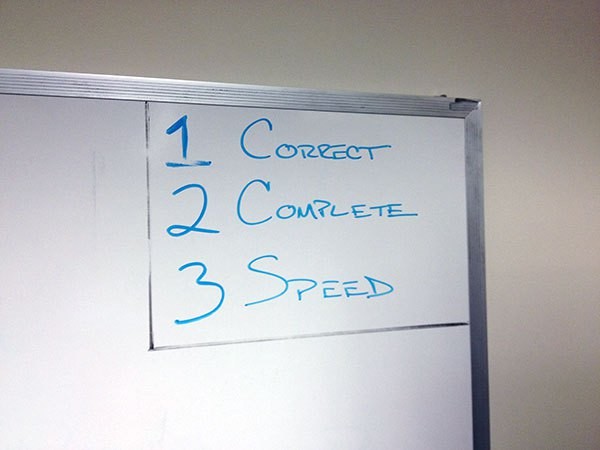
On an Information Technology Service Desk it is important to quickly resolve issues from the people you support. People often do not contact you until they cannot do their job becuase of a problem, so you are the person who gets them back to work. When working in a roll like this, it is easy for support staff to start rush through a problem, and therefore not really finishing the task. This causes rework: the same end user contacts you again about the same (or related) problem, and you have to solve it, again. I have found that to finish a given task you need to do three things:
Three steps to finished: correct – complete – speed
-

No excuses at work. I wrote this years ago on the whiteboard in the IT Lab to serve as a daily reminder. Correct – When solving a problem, you have to start with the correct answer. This may be the most difficult part of solving a problem, but it is the easiest step to remember in this process. If you are not correct, you know you are not finished; you keep on working the problem until you solve it. Now you can move on to the second step.
- Complete – This step is an important one. You cannot skip it for the simple reason that until you are complete the timer is still running. No matter how fast you can correctly solve a problem, until you completely solve a problem, you are not finished. Skipping this step is the most common cause for rework.
- Speed – This step comes naturally after the first two steps are done. When you are correct and complete the timer finally stops. This step is in place more to illustrate the fact the you cannot have speed without being correct and complete. If you want to finish faster, work on the first two steps, don’t skip them.

One point of dicussion in regards to speed is that people often feel they do not have time to “waste” or “slow down” so that by being complete they are not working fast enough. However this issue has more to do with understanding prioroties and what to work on, not how to work on it. To illustrate this point, we will apply these steps to a simple task.
Example: A Simple Problem
A person contacts the Service Desk and has a problem with a printer connected directly to their computer.
- First get correct. After troubleshooting it is determined the printer needs to be replaced. The old printer is disconnected, and a new printer is put in place. It is a USB printer, and when connected to the computer the new printer is detected and the drivers install automatically. A test print is successful. This is now correct, as the computer can print again. It is not complete.
- Second get complete. To get complete a few more things should be done. When a USB printer is replaced, the new printer often is detected as a second ( read: additional ) printer. The first printer will simply be listed as offline so it needs tonot only be removed physically but also removed from software. If the old printer is not removed in software there is a chance someone will try to print to the old printer and nothing will print. Additionally, you often need to set the new printer as the default printer for the system, something that does not always happen automatically. If the new printer is not set to the default, some people will get confused when they try to send a print job. Two quick steps, each only taking seconds to complete, and each one preventing potential issue in the future. Each one prevents rework.
- Finally get speed. The timer has stopped. Getting correct got the basic job done. Getting complete only added seconds. Do this enough times and it becomes natural.
One Final Note
As it turns out, when I got to work the next morning after writing this blog, a new Service Desk ticket was waiting in the queue. It was a request from a user to fix a printer that was installed on a computer the day before…It would not print correctly. The fix was to set the new printer as the default. I had to laugh out loud as soon as I read the ticket. Real life: you just cannot make this stuff up.